
A password proves someone knows a secret. MFA asks for a second, different kind of proof, so a stolen password on its own is no longer enough to get in. Here is how it works, and every way Skillmine Auth can ask for that proof.
September 21, 2026
Every week employees must log into email clients, business applications, cloud platforms, and other online services multiple times. However, much of the content that could be found in these accounts is not supposed to be viewed by anyone, which is why there should be a system verifying the identity of the person attempting to access the account.
Password-based authentication used to be a default option, but as was already mentioned, this form of identification is extremely vulnerable for passwords to be stolen, reused on various accounts, or obtained from phishing websites. As a consequence, nowadays many companies require users to provide more evidence of their identity before they get access to sensitive systems.
Authentication methods may include various things like apps, security keys, and credentials like passkeys. What an authenticator provides to the user in general is the ability to prove that they have an authorized method of logging into the account.
Thus, for organizations that have numerous employees and, therefore, accounts, learning about authenticators is a rational thing to do at the beginning of identity and access management.
An authenticator is whatever a user presents at sign-in to show the account is theirs. A password, a code from an app, a hardware key, or a passkey could all play that role. The service reviews what it receives, checks it against its access requirements, and lets the user in only if those are met.
Consider an employee logging in to a company application. They might type a password and then enter a code from an authenticator app. In a different setup, they could sign in with a security key or a passkey and never type a password at all. The mechanics vary, but the job is the same: helping the system confirm who is actually signing in.
The demand for better authentication has grown as companies depend on more cloud applications, remote access and online services. One stolen password can put an entire account at risk, and the exposure is worse when that password is reused across several services.
A stronger method makes a stolen password far less useful on its own. How much protection you get depends on the method you pick and how carefully it is rolled out. A one-time code adds a worthwhile check, but a phishing page can still trick someone into handing it over. Passkeys and hardware security keys, when set up correctly, hold up much better against that kind of attack because they are tied to the genuine site and won’t respond to a look alike.
For a business, then choosing an authenticator is more than adding a step to the sign-in process. The real aim is to protect accounts in a way that doesn’t make employees’ everyday work harder than it needs to be.
How an authenticator works depends on the method behind it. Some authenticators generate temporary codes that the user types in. Others hold cryptographic credentials that prove a sign-in without anything being typed at all. The easiest way to see the difference is to follow an employee trying to open a company’s internal application.
It starts with the sign-in itself. The employee opens the application and enters a username and password or picks a password with less option if the company offers one. Either way, that action tells the application to begin authenticating them.
What happens next is set by the company’s security settings. A password alone may not be enough, so the system can ask for a second proof: a code from an authenticator app, approval of a sign-in request on a phone, a security key plugged into the device, or a passkey. Which of these appears usually reflects how sensitive the application is and what the organization has decided to require.
The employee then completes the check on screen. With an authenticator app, that means typing in the temporary code it displays. A passkey works differently. The device asks the employee to confirm with a fingerprint, a face scan or the device PIN, checks that local action, and then uses the registered credential to carry the sign-in forward. The biometric or PIN stays on the device and is only used to unlock the credential.
The authentication service then validates the response against the method registered to the account. For a one-time code, it confirms that the code is correct and still inside its allowed time window, which is why an old code fails even if it was once valid. For a passkey, it verifies a cryptographic response tied to the registered credential and to that specific sign-in request, so a response captured for one attempt cannot be reused for another.
The outcome follows from that check. If verification succeeds and the account meets the required security conditions, the employee continues into the application. If it fails, the system can refuse the request or offer another permitted method, such as a backup code or a second registered device.
It helps to keep authentication separate from authorization, because the two are often confused. Authentication answers who is signing in. Authorization answers what that person is allowed to reach once they are in, whether that is particular applications, files or other resources. A user can be fully authenticated and still be denied access to a system their role does not cover.
Businesses have several authentication methods to choose from, and none of them is best in every situation. Each trades convenience, cost and resistance to attack differently, so the right choice depends on who is signing in and what they are trying to reach.
Authenticator apps
Authenticator apps run on a smartphone and can verify a user in a few different ways. Some generate time-based one-time passwords (TOTP), temporary codes that change at regular intervals. Others send a push notification that the user approves or rejects, and some now support passkeys as well.
In practice, an employee enters a password, then opens the app and types in the six-digit code it shows. TOTP has a practical advantage: codes can usually be generated without an internet connection, so it still works when someone is travelling or has poor signal. The weaknesses are that the phone itself has to be protected, and a code can still be exposed through phishing or other attacks.
Hardware security keys
A hardware security key is a physical device that confirms a sign-in. Depending on the model, it connects over USB, NFC or another supported interface. Many modern keys support FIDO2 and WebAuthn, which use public-key authentication. Because the credential is tied to the legitimate website or service, a lookalike page has nothing to capture, which is what gives these keys their protection against phishing.
That makes them a sensible fit for administrators, IT teams and anyone who handles sensitive business information. The catch is logistics. A physical device can be lost, so organizations should decide in advance how keys will be issued, replaced and revoked.
Passkeys
Passkeys let people sign in without a traditional password. They rely on a cryptographic credential linked to a specific account and service. The credential may be stored on a device or managed by a supported credential provider, and at sign-in the user typically confirms with a fingerprint, a face scan or the device PIN.
It is worth being precise about what that biometric or PIN does. It unlocks the credential locally on the device and is not sent to the website the way a password would be. Like security keys, passkeys are designed to work only with the service they were registered for, which is why they help prevent phishing. How they are backed up and synchronized depends on the device and the passkey provider, so that is a point to check before rolling them out widely.
Biometric authentication
Biometric authentication uses physical characteristics such as fingerprints or facial features to help verify a user. An employee might use a fingerprint reader or face recognition to unlock a laptop or to approve the use of a stored credential.
The appeal is convenience, but biometrics usually form one part of a broader authentication process rather than standing alone. How secure they are depends on how the biometric check is implemented and on what credential or action it protects.
SMS and email verification codes
Some services send a temporary code by text message or email. These methods are familiar and easy for most people to use, which explains why they are so common. They also have real limitations. SMS codes can be exposed through SIM-swapping attacks or phone-number takeover, and an emailed code is only as safe as the email account that receives it. For sensitive business accounts, organizations should move to stronger methods wherever they are available.
Push authentication
With push authentication, the user receives a sign-in request on a registered device and approves or rejects it. It is faster than typing a code each time, and that speed is also its weakness. When unexpected approval requests keep arriving, a tired or distracted user may tap approve by mistake. Number matching, clear sign-in details shown in the prompt, and phishing-resistant methods can reduce that risk considerably.
People often use the two terms interchangeably, but they describe different things. “Authenticator” is the broader category: any method, device or credential a person uses to prove they control an account. An authentication app is narrower. It is a software application that delivers one or more of those methods, usually on a smartphone.
A hardware security key shows why the distinction matters. It is a perfectly good authenticator, yet it involves no mobile app at all. An authentication app, by contrast, can offer several methods in one place: it might generate one-time codes, send push notifications for approval, or support passkeys. So an app is one way of packaging authenticators, not the only way.
This becomes more than a vocabulary point when a business starts comparing products. Two tools can both be marketed as authenticators and still differ sharply in what they support and how much protection they give. One may offer only time-based codes that a phishing page can capture, while another supports passkeys or FIDO2 security keys that resist phishing. Taking the label at face value can leave a gap between what the team thought it bought and what it actually deployed.
A few questions are worth settling before choosing a solution:
The first tells you the ceiling on protection. The second shows how much effort onboarding will take. The third is the one that tends to surface at the worst moment, when an employee is locked out and the help desk needs a clear, secure way to restore access.
An authenticator and multi-factor authentication (MFA) sit at different levels. An authenticator is a single tool used to verify a user. MFA is a sign-in process that requires two or more distinct authentication factors before access is granted. One is a component, the other is a policy built from components.
The factors themselves fall into three familiar categories: something you know, such as a password or PIN; something you have, such as a registered security key or device; and something you are, such as a fingerprint or other biometric characteristic.
Consider an employee who enters a password and then approves the sign-in on a registered device. The first step draws on something they know, the second on something they have. Because two distinct factors are verified, the process can qualify as two-factor authentication.
The reverse does not always hold, and this is where organizations tend to go wrong. Using an authenticator does not automatically mean MFA is in place. A one-time code from an app proves that the user controls a registered authenticator, but on its own that code is a single factor, not two. MFA exists only when the sign-in process is designed to verify the required factors. Buying an authenticator app and switching it on does not guarantee that.
MFA is still worth having. It lowers the risk of account compromise when a password is stolen, because the attacker needs more than the password to get in. But “MFA enabled” is not a uniform standard of protection. Codes and push approvals can be defeated by certain phishing and social-engineering attacks, for example when a user is tricked into typing a code into a fake login page or approving a request they did not initiate.
For accounts that need stronger protection, such as administrators and anyone with access to financial or sensitive data, businesses should look at phishing-resistant methods. Appropriately implemented passkeys and FIDO2 security keys fit that description, since they are tied to the legitimate service and give a lookalike page nothing to capture.
Most of a company’s daily work now happens inside applications, and every one of them sits behind an employee account. That makes accounts a security boundary in their own right. A single compromised account can expose company documents, customer information, financial records or administrative tools, depending on what its owner is allowed to reach. Authenticators add a layer of protection to the sign-in so that access depends on more than a password.
Stolen passwords are the usual starting point
Passwords leak in ordinary ways. Employees reuse them across services, share them with colleagues for convenience, or type them into a fake sign-in page that looks convincing enough. Once an attacker holds a valid password, the sign-in screen has nothing left to stop them.
An additional authentication method changes that, because the stolen password is no longer enough on its own. How much it helps depends on the method. Some verification codes can be captured through phishing in the same way a password can, so the protection is real but not equal across options.
Not every account carries the same risk
Employees do not all need access to everything, and the sign-in requirements should reflect that. Strong authentication matters most for accounts that can reach confidential information or carry out sensitive actions. A finance administrator who can approve payments warrants tougher protection than someone who only reads the internal noticeboard. Applying the same light check to both leaves the more valuable account underprotected.
Work no longer happens in one place
People sign in from home, from a branch office, or from an airport. A network perimeter does little to verify a user in that situation, so the identity of the person signing in has to be checked directly. Authenticators do that across different working environments, and they can be paired with other access policies so that a sign-in that looks higher risk triggers an additional check. A login from an unfamiliar country at an odd hour, for instance, can be challenged while routine sign-ins pass without friction.
Less reliance on passwords
Passwords are hard to manage well, particularly when an employee has to keep track of many applications. Passkeys and other passwordless methods reduce how much people need to remember and type. That tends to make signing in easier, and it also takes away the stored secret that many common password attacks depend on.
One set of rules instead of many
When authentication runs through an identity provider or an IAM solution, a business can apply consistent sign-in policies across the applications it supports. IT administrators can require MFA for user groups, or demand stronger authentication before anyone reaches a sensitive system. Without that central control, each application becomes its own separate project, with its own settings to maintain and its own gaps to find.
No single authenticator suits every business. The right choice depends on which applications employees use, how sensitive the company’s data is, what devices people have, and what the organization’s security requirements demand. The most practical way to narrow the field is to work through a handful of questions in a sensible order.
Begin with the accounts that matter most
Start by identifying which accounts would do the most damage if compromised. Administrator accounts, financial systems and applications that hold confidential information usually top that list. Those are the accounts where stronger authentication earns its cost, and where phishing-resistant methods such as passkeys and security keys deserve serious consideration. Deciding this first keeps the rest of the evaluation grounded, because it sets the level of protection you are actually shopping for.
Test it against ordinary working days
A security method has to survive everyday use. An employee who moves between a laptop, a phone and a tablet needs an option that supports all of them, and one that doesn’t will generate a steady flow of sign-in problems. Friction has a cost: it shows up as support requests, workarounds and frustrated staff. It helps to walk through the full journey before committing, including how people register their authenticators, how they sign in day to day, and how they regain access when something goes wrong.
Confirm it works with what you already run
Check that a candidate authenticator works with your existing identity provider, your business applications and your devices. Standards such as FIDO2 and WebAuthn, along with supported authentication protocols, improve the odds of compatibility, but the details depend on the specific products involved. A standards badge on a datasheet is a starting point for testing, not proof that it will work in your environment.
Plan for lost devices before they are lost
Phones get lost, laptops get replaced, and recovery details get forgotten. Your business needs a secure process for registering a replacement authenticator and revoking the old one. Recovery deserves the same scrutiny as sign-in itself, because it can quietly become the weakest route into an account. If an attacker can talk a help desk into resetting access, the strongest authenticator in the building has been bypassed. Recovery should never become an easy way around the normal authentication requirements.
Look at what administrators will actually manage
IT teams have to manage registered credentials, enforce policies and respond to suspicious sign-in activity, so the administration and reporting features matter as much as the sign-in experience. In larger organizations, centralized administration makes it far easier to apply consistent rules across departments and applications instead of maintaining them one by one.
Count the full cost
The price of the product is only part of what authentication costs. Hardware purchases, software subscriptions, employee onboarding, help-desk support and ongoing administration all belong in the calculation, and the ongoing items often outweigh the purchase price over time. The best option is the one that meets the security level you need while fitting your budget and your IT environment.
Choosing an authentication method is only the first half of the job. Most of the weaknesses that show up later come from how the method is used and managed, not from the technology itself.
Approving requests nobody should have approved
Employees should never accept an authentication request they did not start. Attackers know this and exploit it by sending push notifications repeatedly, betting that a tired or distracted user will eventually tap approve just to make the prompts stop. A late-night burst of requests is a common version of this attack.
Clear instructions help, but the stronger fix is in the design. Number matching, where the user must enter a number shown on the sign-in screen, removes the option of approving blindly, and it is worth turning on wherever the product supports it. User awareness fills the remaining gap: people who know what an unexpected prompt means are far more likely to reject it.
Treating SMS codes as enough
SMS verification may be acceptable in some situations, and it is better than a password alone. Its weakness is the phone number itself. An attacker who takes over a number, often through SIM swapping, receives the codes meant for the legitimate user. Businesses should ask whether stronger methods are appropriate for any account that reaches sensitive data or administrative controls. Since those are the accounts, an attacker will target first.
Leaving old credentials active
When an employee loses a phone or switches to a new authentication method, the old credential often needs to be revoked. It is easy to skip that step. A credential that nobody uses but that still works is a standing risk, because a lost device can remain a valid way long after everyone has forgotten about it. Regular clean-up of credentials that are no longer needed keeps that exposure small.
Weak account recovery
A strong authenticator protects very little if the account can be taken over through a weak password-reset process. Attackers look for exactly this, and a convincing phone call to a help desk can be enough where recovery is loose. Recovery procedures should verify the user’s identity properly and give the organization a controlled way to restore access, so that the fallback is never easier than the front door.
Skipping employee training
People need to understand how their authentication method works and what to do when a sign-in request looks unfamiliar. Training does not have to be elaborate. A short set of simple instructions covers most of it: reject requests you did not initiate, report anything suspicious, and keep registered devices protected. Those few habits can stop an attack that the technology alone would not have caught.
Failing to Review Authentication Policies
Security needs shift as people changes roles and the business adopts new applications. An authentication requirement that made sense two years ago may no longer match the risks today, for example when an employee moves into finance but still carries the access settings of their old team. Organizations should review their authentication requirements periodically to confirm they still fit current risks and business needs.
Authenticators and identity and access management (IAM) solutions are designed to work together, but they do different jobs. An authenticator verifies a user’s identity at the moment of sign-in. An IAM solution handles the wider lifecycle around that moment: creating user accounts, assigning permissions, applying access policies, and removing access when it is no longer required. The authenticator answers “who is this?”, and IAM governs everything that follows from the answer.
The easiest way to see the split is to follow a new hire through onboarding. The employee’s account is created first and linked to the right department or job role, which determines what they will eventually be allowed to do. The employee then registers an approved authentication method, whether that is an authenticator app, a passkey or a security key. Registration belongs early in the process because an account with no registered authenticator either cannot sign in or falls back on weaker options.
From then on, each sign-in to a connected application follows the same pattern. The authentication system checks the employee’s credentials. Once the required verification succeeds, the IAM system or the connected application applies to the permissions attached to that person’s role. Passing authentication does not open every door. A member of the finance team, for example, may be able to view financial records but not approve transactions. Authentication establishes that the person is who they claim to be, and authorization decides whether they can perform the specific action they have requested.
The same arrangement matters at the other end of the employment relationship. When someone changes roles, their permissions should change with them, so they don’t carry the access of a previous team indefinitely. When someone leaves, their account and registered credentials should be disabled or revoked as appropriate. Without that clean-up, a departed employee’s phone or security key can remain a working way into company systems. Tying these steps to a central IAM process makes them routine rather than something an administrator has to remember.
Connecting authentication with IAM policies pays off most at scale. Rather than configuring each application separately, a business can manage user access more consistently across every supported application, with one set of rules for who must verify how, and one place to change them.
Authenticator apps, passkeys and hardware security keys can all protect accounts, but they work in different ways and suit different situations. The table below sets out the main differences before the discussion of which to choose.
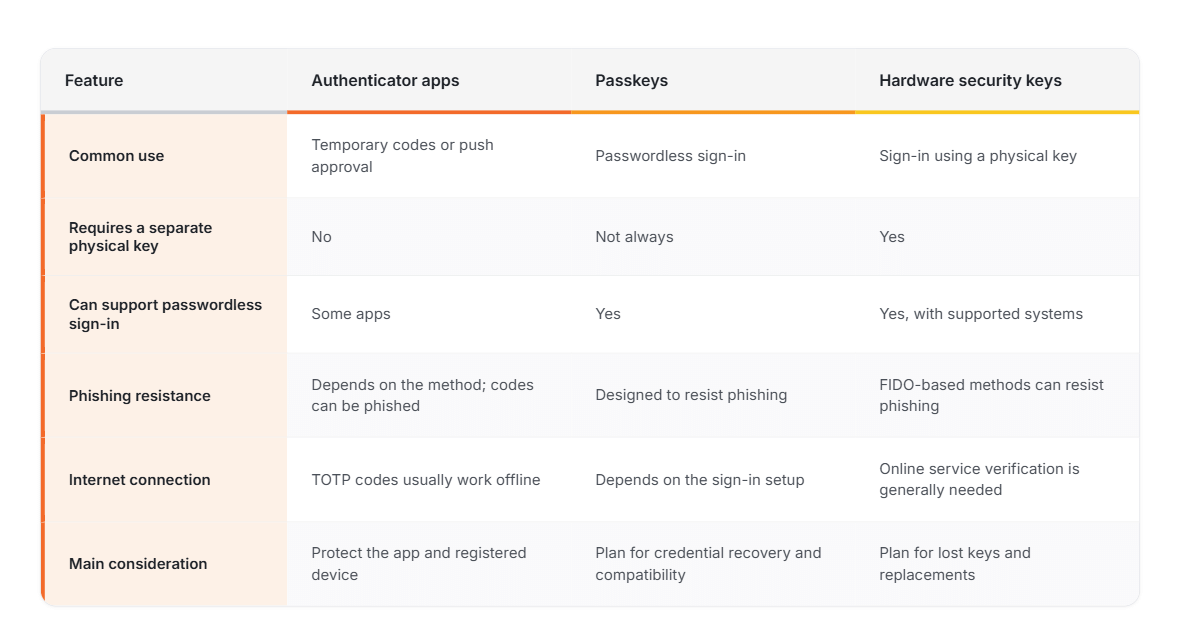
The table is a general comparison. What a given product can do depends on its implementation and on the authentication standards it supports, so it is worth confirming details with the vendor before relying on any single row.
The answer is rarely one method for everyone. Each option fits a different starting point.
Authenticator apps are often the easiest place to begin. Most employees already know the routine of typing in a code, and the apps add verification to existing password-based sign-ins without changing how people log in. The trade-off is that codes and push approvals can be phished, so they offer a solid improvement rather than the strongest protection.
Passkeys make sense for organizations that want to cut down on passwords while keeping sign-in convenient. Because there is no password to type, there is also none to steal or reuse. Before a wide rollout, check how credentials are recovered and whether your applications and devices support them, since those two points tend to decide how smooth adoption is.
Hardware security keys are a strong fit for high-risk accounts, particularly where phishing resistance is the priority. They carry a logistical cost, since keys have to be bought, issued, and replaced when lost, which is why they are usually reserved for the people whose accounts matter most.
Many organizations end up using more than one. A common arrangement is to encourage passkeys for everyday users and require security keys for administrators. Whatever the mix, the decision should rest on four things: the organization’s security needs, application compatibility, the user experience, and how access will be recovered when a device goes missing.
A good authentication policy sets clear rules for both users and administrators. Buying a strong authenticator is the easy part. Keeping the whole arrangement trustworthy over time, as people join, change roles, lose devices and leave, is where most of the effort goes. The practices below cover ongoing work.
Match the method to the sensitivity of the account
Accounts with administrative privileges or access to confidential information deserve more than the default protection. Where possible, use phishing-resistant authentication for them. These accounts are what an attacker is after, so a stronger sign-in requirement here protects far more than the same requirement applied to everyone else.
Control how new authenticators are registered
Registration is a quiet point of weakness, because an attacker who can add their own authenticator to an account no longer needs to defeat the existing one. Organizations should set out a clear process for registering new authenticators. Users should know which devices and methods are approved, and how to report a credential they do not recognize. A notification that a new authenticator was just added is often the first visible sign that something is wrong, but it only helps if people know what to do with it.
Review what is registered
Accounts accumulate credentials over time: old phones, replaced laptops, keys issued for a project that ended. Review the authenticators attached to user accounts periodically, remove the ones that are no longer required, and investigate any registration nobody can explain. A short review, repeated regularly, keeps the list from growing into a collection of forgotten ways in.
Build recovery that cannot be talked around
Employees will lose their phones and security keys, so they need a way back into their accounts. Recovery should include suitable identity checks and controls that prevent unauthorized credential replacement. This is the step attackers probe most often, because a fallback that is easier than normal sign-in makes the stronger methods pointless. If a help desk can reset an account on the strength of a confident phone call, the policy has a hole in it.
Treat offboarding as a security task
When someone leaves, offboarding should go beyond closing the main account. Disable the relevant accounts, revoke active sessions where appropriate, and review both the registered credentials and the access to connected applications. Sessions are easy to overlook: a signed-in device can stay signed in after the account has been disabled elsewhere unless it is explicitly revoked.
Watch the sign-in logs
Authentication logs show unusual sign-in attempts, repeated failures, unexpected changes to registered methods, and other suspicious account activity. They are most useful when read alongside other security information. On their own, a log entry is a clue rather than proof of an attack, since a string of failed sign-ins can just as easily come from someone mistyping a password after a holiday.
Update methods and policies as things change
Security requirements shift and technology move on, so the methods an organization supports, and the policies around them need periodic review. When changes are made, make sure employees understand them before they take effect. A new requirement that arrives without warning tends to produce a wave of support tickets and workarounds, which undermines the security gain it was meant to deliver.
Businesses want better protection for their accounts without making sign-in harder than it needs to be, and that tension is shaping where authentication is heading. Several trends stand out.
Passkeys are moving into the mainstream
Passkeys are becoming a serious option for password less authentication. They reduce reliance on passwords, and when implemented correctly, they help prevent phishing, since there is no shared secret for a fake page to collect. What has held many businesses back is uneven support across devices and applications. As that support widens, more organizations are likely to treat passkeys as part of their core authentication strategy rather than an experiment.
Phishing resistance is becoming the priority
Passwords and some verification codes share a weakness: both can be captured by a convincing fake sign-in page. Methods built on public-key cryptography, including supported FIDO2 credentials, are designed to close that gap, because the credential only responds to the legitimate service it was registered with. Expect organizations to put these methods first on accounts that carry the most risk, such as administrators and finance users, before extending them more widely.
Sign-in checks that adapt to risk
Some systems already weigh signals such as device information, sign-in location, and unusual activity when deciding whether to ask for more verification. A login that looks out of character can trigger an extra step, while routine sign-ins pass with little friction. These signals are not perfect, though. A traveling employee can look suspicious, and a careful attacker can look normal. Risk-based checks work best as a complement to a sound authentication policy and should not stand in for one.
Authentication tied more closely to identity platforms
As the number of cloud applications grows, authentication cannot be used on its own. It must work alongside account provisioning, single sign-on (SSO), access policies, and monitoring. The closer those pieces are connected, the easier it becomes for IT teams to manage authentication across supported services from one place rather than application by application.
Account recovery is getting more attention
Going passwordless raises practical questions that passwords never did: what happens when a device is replaced, how credentials synchronize between devices, and how someone regains access after losing everything. Recovery is also where attackers tend to look for the easiest way in. Organizations will need processes that are convenient for legitimate users yet difficult to exploit, and that balance is likely to decide how smoothly passwordless adoption goes.
Taken together, these trends point in one direction. Authentication is moving beyond passwords alone, with greater emphasis on phishing resistance, usability and consistent management across applications.
Every sign-in is a small decision about trust, and authenticators are how a business makes it. They let a company confirm who is at the door before anyone reaches its applications and sensitive information. The methods differ in what they give you. Authenticator apps and temporary codes are familiar and easy to roll out. Passkeys and hardware security keys ask more in planning and logistics, and in return they offer much stronger resistance to phishing.
Picking among them takes more than comparing sign-in screens. Phishing resistance, compatibility with the applications you already run, what employees can realistically live with, and how lost devices are handled all shape the result. Each of those must fit into the wider security policy, because a strong authenticator sitting on top of a weak recovery process protects less than it appears to.
The picture improves when authentication is tied to IAM. Verification, access rules and account changes then follow the same logic: people are checked at sign-in, given only the access their role calls for, and cleanly removed when they move on or leave. That consistency is hard to achieve when each application is managed on its own.
For any business rethinking how employees sign in, a clear grasp of authenticators is the sensible place to begin an identity security strategy.
If you are looking to improve user authentication and access management, visit Skillmine Auth to learn more about managing authentication and controlling access to business applications.


Your first line of defense against unauthorized access and malicious intruders.
Quick Links
Skillmine Products
Your first line of defense against unauthorized access and malicious intruders.
Quick Links
Skillmine Products
©2026 Skillmine. All rights reserved.
HAPPY
It's Diwali!
Be safe, enjoy with your loved and known ones,
spread the happiness, and be compliant for safety.
With many organizations recently impacted by access breaches, it's a timely reminder to safeguard your access entry points.
 does just that