
A password proves someone knows a secret. MFA asks for a second, different kind of proof, so a stolen password on its own is no longer enough to get in. Here is how it works, and every way Skillmine Auth can ask for that proof.
September 21, 2026
Identity and Access Management (IAM) is a framework that helps organizations manage digital identities and control access to applications, systems, and data. It verifies user identities, assigns permissions based on roles, and ensures that users can access only the resources they are authorized to use. IAM solutions include features such as Multi-Factor Authentication (MFA), Single Sign-On (SSO), and user provisioning to help businesses strengthen security and manage access effectively.
Nearly everything a business does now involves someone, or something, logging in. Employees open work apps, customers sign in to online services, and software systems pass data back and forth without anyone touching a keyboard. Add more people, more apps, and more cloud tools, and it gets hard to answer a simple question: who can get into what?
That’s the problem identity and access management (IAM) is built to solve. It gives a company one organized way to manage identities and decide what each of them is allowed to do.
Keeping business data protected
Nobody needs access to everything. Someone in HR needs employee records, while someone in finance needs invoices and payment details. Neither needs the other’s files.
With IAM, permissions follow the job. People get what they need to do their work and nothing more, so sensitive information isn’t sitting open to anyone who happens to have a login.
Making it harder for outsiders to get in
Passwords get stolen, reused, and guessed. It happens all the time. If a password is all that stands between an attacker and your systems, you’re in trouble.
IAM adds stronger sign-in checks, like multi-factor authentication, and limits what any one account can reach. Even if someone does get hold of a login, they can’t get very far.
Handling people who join, move, and leave
Staff change roles, switch teams, and eventually move on. Their access has to keep up. Otherwise you end up with a former employee whose account still works, or a long-serving employee who has collected permissions from every job they’ve ever held.
IAM lets IT set up new accounts quickly, adjust access when roles change, and shut it off when someone leaves, without chasing it system by system.
Supporting remote and cloud work
People now work from the office, from home, or from a coffee shop, and the apps they use are spread across different platforms. IAM helps apply the same sign-in rules and access policies across all of it, so security doesn’t depend on where someone happens to be sitting.
Knowing who has access to what
Once access is spread across many systems, even simple questions get tricky. Who can see this folder? Why does this account have admin rights?
Centralized identity records and access logs help IT teams review permissions, look into anything unusual, and spot accounts that need attention before they become a problem.
In 2026, security is about more than controlling who gets in. It’s also about what people can do once they’re inside. IAM helps businesses keep track of both.
Picture the lifecycle of any employee: they join, they change roles once or twice, and eventually they leave. The applications they need are different at each stage. In a small company, IT can juggle that by hand. Once you have hundreds of people, it stops being realistic, and that’s the gap IAM solutions fill.
Step 1: Create the user account
It starts when a new hire arrives and needs an account. Their name, department, and job title decide what access they’ll get. Some companies let the HR system do this automatically as soon as the hire is entered. Others have IT create the account once an approved request lands in the queue.
Step 2: Verify who is signing in
Before the employee can open anything, the system has to be sure the person logging in is who they claim to be. That’s authentication. The method varies with company policy and the platform in use. It could be a password, an authenticator app, a security key, or a passkey.
Step 3: Decide what they can access
Different people need different information, so the IAM solution checks permissions before letting anyone into an application or resource. Take a finance team member. They might be able to view financial records but have no right to approve payments, which usually belongs to a manager because of the responsibility that comes with the role.
Step 4: Update access when roles change
Roles rarely stay fixed. People move departments, get promoted, or pick up extra duties, and their permissions have to follow. Just as important is taking away what they no longer need. When that step gets skipped, employees end up carrying access from every job they’ve had, which makes little sense for the work they do today.
Step 5: Track account activity
IT needs to see what is going on across company accounts. IAM systems can record failed sign-in attempts, permission changes, and what administrators have done. If someone reports a problem or a strange login shows up, the security team has a record to work from instead of guessing.
Step 6: Close accounts and remove access
When an employee leaves or a contractor finishes their work, their access should end. An account that stays open after someone has gone is a risk that didn’t need to exist. IT may also have to end active sessions, check accounts in connected applications, and disable any related credentials, so the person can’t reach company resources they’re no longer authorized to use.
Over the course of a workday, most employees sign in to a handful of applications, sometimes more. The business, meanwhile, has to be confident that only authorized people get through. Multi-factor authentication (MFA) and single sign-on (SSO) both serve that goal, but they approach it from different directions.
Multi-factor authentication (MFA)
MFA adds a second check to the login process. A password alone is no longer enough; the user has to prove their identity with at least two different types of factor. These usually fall into three groups:
In practice, an employee might type in their password and then approve the login through an authorized method, such as a prompt on their registered device.
The benefit is straightforward: a stolen password on its own no longer opens the account. That said, how much protection you get depends on which methods you allow and how they’re set up. Some are considerably stronger than others. For administrator accounts and other sensitive access in particular, it’s worth looking at phishing-resistant options like properly implemented passkeys or security keys. CISA has published guidance on implementing phishing-resistant MFA if you want a reference point.
Single sign-on (SSO)
Anyone who has had to keep track of a separate login for every work application knows how tedious it gets. SSO removes most of that friction. Users authenticate once through the company’s identity provider, and that session gives them access to the connected applications that support it, without re-entering credentials each time.
For employees, that means a smoother login experience. For IT, it means authentication policies can be managed in one place across the supported systems instead of app by app.
Using MFA and SSO together
The two do different jobs. MFA is about confirming that the person signing in is who they say they are. SSO is about making access to connected applications easier once that’s done.
Combined, they let a business keep sign-in controls strong without asking people to go through a separate login for every tool. A typical case: an employee signs in to the company portal using MFA, then opens several connected applications through SSO without being prompted again.
There is a trade-off to keep in mind. When one central identity account opens the door to many services, that account becomes a high-value target. It needs real protection: strong authentication, a secure account recovery process, sensible session controls, and regular monitoring.
The two terms get swapped so often that it’s easy to assume they mean the same thing. They overlap, but each has its own focus.
IAM is mostly about running identities: creating them, verifying the people behind them, and deciding which resources each one can reach. Identity security looks at the bigger picture. Its concern is keeping those identities from being compromised or misused, and catching problems like excessive permissions before they turn into incidents.
The difference at a glance
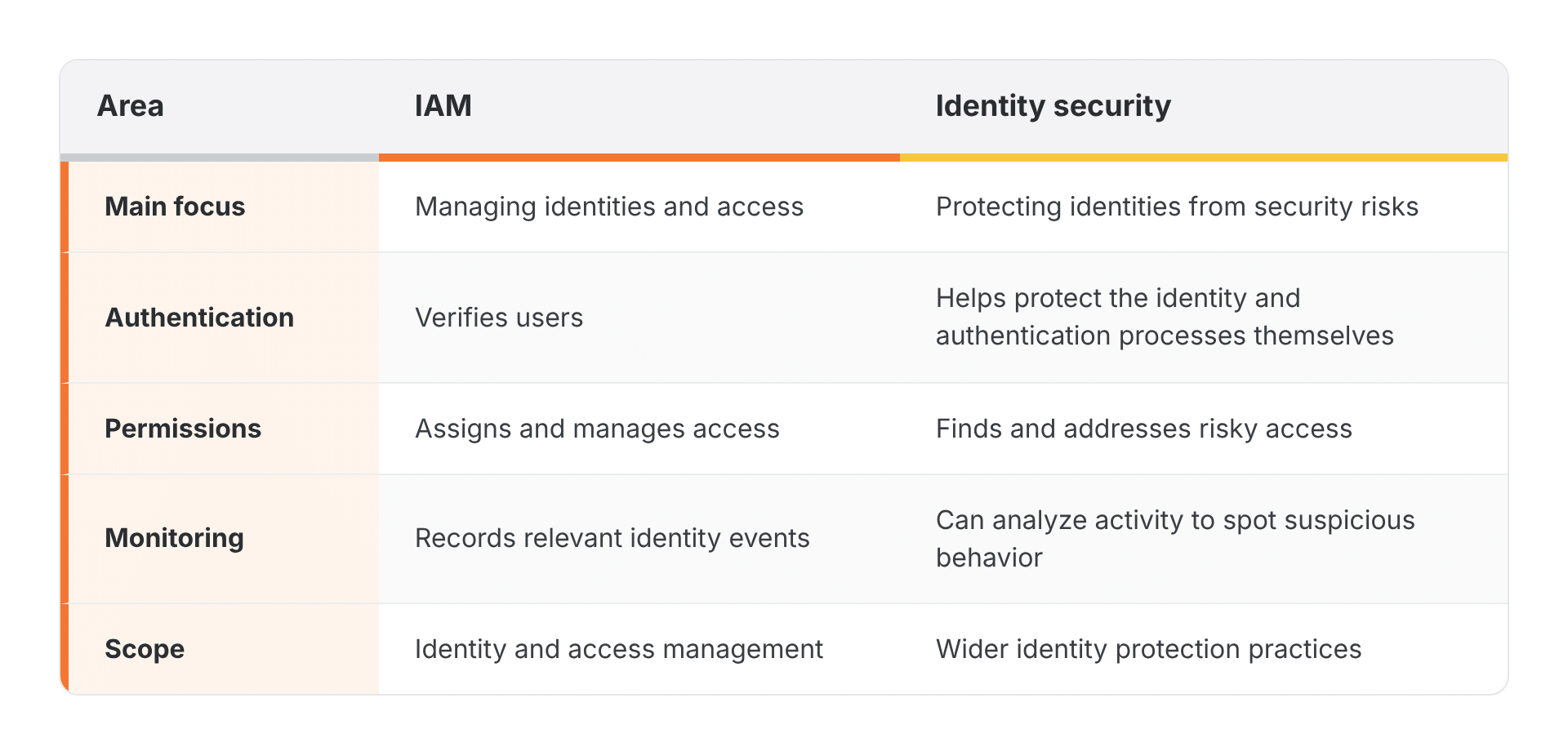
How the two fit together
Take an administrator with access to sensitive company systems. The IAM side would require that person to use MFA and would assign permissions based on what their job actually involves.
Identity security picks up from there. It might review how that privileged access is being used, watch for unusual sign-ins, and help the security team investigate if an account looks like it has been compromised.
Neither one replaces the other. IAM sets the access rules and enforces them. Identity security deals with what can go wrong around those identities.
Most attacks don’t begin with a clever exploit. They begin with a login. An attacker steals a password, talks an employee into approving a sign-in, or finds an account with far more access than it needs. If you know which of these, you’re facing, it’s easier to decide where to spend your security effort.
Phishing
A fake email, message, or login page is all it takes. The employee thinks they’re signing in to something legitimate and hands over a password or a one-time code. Some of these look very convincing.
Training helps, but only if people feel comfortable reporting something odd without worrying, they’ll be blamed. Where possible, add phishing-resistant authentication so a stolen code isn’t enough on its own.
Credential theft
Passwords leak through phishing, through breaches at other companies, and in plenty of other ways. Once an attacker has a working username and password, they simply try it against your business applications and see what opens.
MFA is the first line of defense here. Beyond that, discourage password reuse, lock down account recovery (attackers often go through it), and watch for sign-ins that don’t fit a user’s normal pattern.
Password spraying
Guessing many passwords against one account gets noticed quickly. Spraying flips this: the attacker takes a few very common passwords and tries them across many accounts. Each account sees only one or two failures, so a control that looks only at repeated attempts on a single user can miss it entirely.
Look at failed logins across accounts, not just per account. Set sensible authentication policies, and require extra verification on sensitive accounts.
MFA fatigue
Here the attacker already has the password. They trigger approval prompts again and again, sometimes in the middle of the night, until the user taps “approve” to make it stop or just by mistake.
Employees should know that a prompt they didn’t start is always a reason to decline, and to report it. On the technical side, use authentication settings that make this harder, and treat a burst of repeated prompts as something worth investigating.
Excessive permissions
It’s common for people to hold on to access from previous projects and roles. That’s fine until one of those accounts is compromised. At that point, every extra permission is something the attacker can use.
The fix is unglamorous: give people what they need for their job and nothing more, and review access on a regular schedule.
Orphaned accounts
An employee leaves a contractor wraps up, but their account is still active. No one is using it, and often no one is watching it either, which is what makes it appealing to an attacker.
A clear offboarding process matters here. Just as important is confirming that access was removed in each relevant application, not only in the main directory.
Machine identities
Not every identity belongs to a person. Applications, APIs, and automated services also authenticate with credentials, and these are easy to forget about. If they’re poorly managed or carry more permissions than the job requires, they become gaps that can sit unnoticed for a long time.
Start by keeping an inventory of machine identities and assigning an owner to each. Protect the credentials they use and remove access that is no longer needed.
A good IAM tool won’t fix much if nobody has decided who should get access to what. You still need written access policies, a habit of checking them every so often, and staff who know that protecting their own account is part of their job. These practices can help.
Follow the principle of least privilege
People should have the permissions their job requires and nothing beyond that. Someone who only needs to read reports shouldn’t be able to edit them by default. Administrator access deserves extra care: keep it limited, and review it often.
Use strong authentication
Turn on MFA for important accounts and applications. For administrators and other high-risk users, use phishing-resistant methods wherever that’s practical. Account recovery needs the same attention, because a weak recovery process can let someone walk around the authentication controls you’ve put in place.
Automate account management
Every time someone joins, changes roles, or leaves, their access has to change with them. Structured workflows make that easier for IT: accounts get created, approved permissions get assigned, and access gets removed when it should. Automation doesn’t replace oversight, though. Approvals and checks still belong in the process.
Review access permissions regularly
What made sense on someone’s first day may not make sense six months later. Look at access to sensitive systems, administrator accounts, third-party accounts, and inactive users in particular. Anything that’s no longer needed should be taken away.
Manage machine identities
Service accounts, API tokens, certificates, and application credentials are identities too, and they’re easy to neglect. An organization should know which ones exist, who owns each of them, and what they can reach.
Monitor important identity events
Suspicious authentication attempts, unexpected permission changes, and unusual administrative activity all need someone’s attention. Decide ahead of time which events to get escalated, and make sure the teams involved know how to investigate them.
Test policies and integrations
Before rolling out a major change, run through the everyday scenarios: onboarding, transfers between departments, account suspension, and offboarding. Confirm that connected applications receive the right identity information, and that permissions change the way you expect them to.
Train employees and administrators
Employees should be able to recognize a phishing attempt and know to report sign-in requests they didn’t initiate. Administrators need more: guidance on access policies, authentication settings, and how to respond to an incident.
Keeping it all aligned
None of this is a one-time project. Done consistently, these practices help keep access controls in step with the business as it changes and as new security needs come up.
As before, no rewrite can guarantee a particular AI-detector score, so give it a quick read and adjust a few phrases to match your own voice
How do you know whether your IAM processes are actually working? Tracking a handful of well-chosen metrics is the most practical answer. KPIs can show how widely authentication is enforced, whether access reviews are getting done, how quickly accounts are handled, and how the team deals with identity-related incidents. Which ones matter most will depend on the size of the organization, the applications it runs, and its security requirements.
Metrics worth tracking
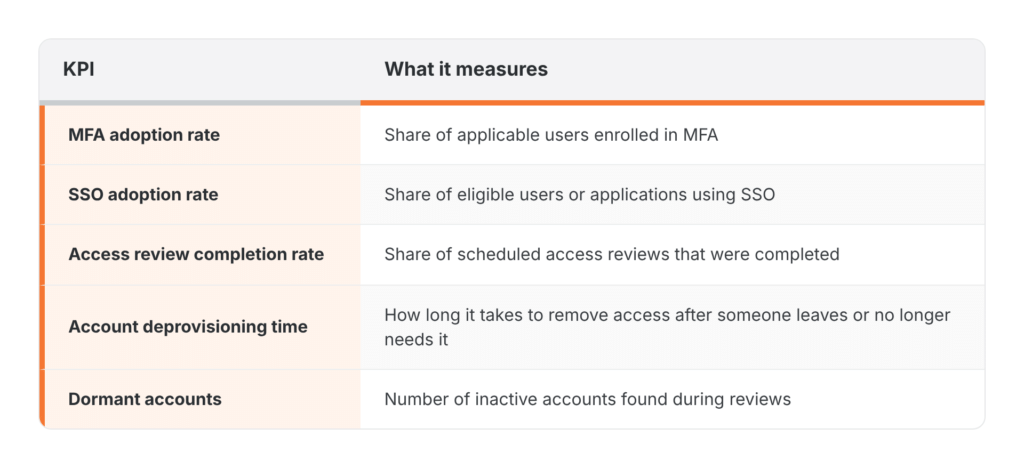
Getting real value from the numbers
Begin with what you already have. Pull your current identity records and security reports and use them as a baseline, so you have something to compare against as your processes improve.
Then let the numbers point you to problems. If disabling a departed employee’s accounts takes several days, deprovisioning time will make that delay visible and help you find where offboarding is getting stuck. In the same way, MFA adoption can show which users or applications still sit outside your intended security policies.
Context matters with every one of these figures. A spike in failed sign-ins could be an attack, but it could just as easily be employees mistyping their passwords after a forced reset. Read the number alongside what was happening at the time before drawing conclusions.
Finally, review the metrics on a regular schedule and act on what they show. A KPI only earns its place if it helps you decide where IAM needs attention next.
Identity security tools don’t all solve the same problem. Some handle logins, some deal with permissions, some are built for administrator accounts, and others watch for suspicious identity activity. Knowing the main categories makes it easier to work out which capabilities your business actually needs.
IAM platforms
An IAM platform is the broadest option. It manages user identities, authentication, permissions, and access to applications in one place. What’s included varies by product, but many offer MFA, SSO, user provisioning, access policies, and reporting.
MFA tools
These add extra verification to the sign-in process. When you compare options, look at which authentication methods they support, how account recovery works, whether they’re compatible with your applications, and what controls administrators get.
SSO solutions
SSO lets employees reach multiple supported applications from a single central sign-in session. Check which of your applications are supported and which authentication standards are available. Also decide how you will protect the central identity account, since it opens the door to everything connected to it.
Identity governance and administration (IGA) tools
IGA tools cover access requests, approval workflows, access reviews, and general oversight of who holds which permissions. They’re most useful when an organization needs a formal process for reviewing who can get to sensitive information.
Privileged access management (PAM) tools
PAM is aimed at accounts with elevated permissions, administrator accounts being the obvious example. Depending on the product, these tools can help control privileged access, manage credentials, and monitor what administrators do.
Identity threat detection tools
These tools analyze identity-related events to flag behavior that may be suspicious, which gives security teams a shorter list of activity to look into. How well they work depends on the data available to them, how they’re configured, and whether there’s a response process behind them.
Cloud adoption, automation, and new sign-in methods keep changing how businesses manage identities. A few developments are worth weighing when you next review your IAM strategy.
Passwordless authentication and passkeys
Passkeys are an alternative to traditional passwords. They rely on cryptographic credentials, and when they’re implemented properly they can protect against many common phishing attacks. Before rolling them out, think through what happens when someone replaces a device, how account recovery will work, and whether your existing applications can support them.
Phishing-resistant MFA
MFA methods differ a great deal in how well they hold up against phishing. For administrators and anyone else with access to sensitive systems, organizations may want to move to stronger options such as security keys or properly implemented passkeys.
AI-assisted identity threat detection
Security analytics and AI-assisted tools can flag unusual sign-in patterns, unexpected permission changes, and other activity that may deserve a closer look. These tools help analysts sort out which alerts to look at first. They can’t make the final call. Expect some false positives, think about what data they’re collecting on your staff, and be careful about letting software act on its own, such as locking an account with nobody checking first.
Machine identity management
Applications, APIs, bots, and automated services often need identities of their own to talk to other systems. The more a business automates, the more of these identities pile up. Keep track of them, protect their credentials, limit what they can reach, and remove access once it’s no longer needed.
Context-aware access controls
Some access policies look beyond the credentials. Depending on the system, they can also take into account the status of the device, how sensitive the application is, and other details about the sign-in. The signals you choose matter. Pick ones that meet your security requirements without getting in the way of legitimate users.
Automated identity workflows
Onboarding, access requests, approvals, role changes, and offboarding can all be automated. Well-designed workflows cut down manual effort and make access decisions more consistent. They still need proper approvals, some oversight, and a way to handle exceptions.
Updated digital identity guidance
In July 2025, the National Institute of Standards and Technology (NIST) published its updated Digital Identity Guidelines, SP 800-63-4, covering identity proofing, authentication, and federation. The official NIST Digital Identity Guidelines are a useful reference when you review your own identity policies and decide which recommendations apply to your environment.
Choosing with a purpose
These developments give organizations more ways to manage identity risk. The point is to pick the ones that solve a real business problem, not to adopt new technology for its own sake.
As with the earlier sections, no rewrite can guarantee a specific AI-detector score. Adjusting a few phrases into your own words is the most reliable way to make it sound like you.
Identity security does more than keep attackers out. It also shapes ordinary work, like how quickly a new hire gets their accounts and whether someone who changes teams ends up with the right access. The scenarios below show how.
Setting up a new employee
A new hire usually needs email, collaboration tools, and a set of applications specific to their department. Without a structured process, IT ends up creating each account and assigning permissions one at a time. Instead of IT handling every request separately, the workflow applies the access rules the company has already agreed on.
Potential benefit: Onboarding becomes more consistent, and you have better control over what a person gets on day one.
Moving an employee to another department
Say someone transfers from HR to finance. They’ll need the accounting applications, but they have no reason to keep access to certain HR systems. People who transfer rarely lose their old access on their own. A proper identity management process handles that for them, so permissions follow the new role and the old ones don’t linger.
Potential benefit: Fewer unnecessary permissions, and access rights that match what people actually do.
Handling offboarding
When someone leaves, their access to business applications has to end. A defined offboarding process gives teams a clear path: disable the accounts, revoke the relevant permissions, and review any related credentials.
Potential benefit: Less exposure from accounts that should no longer be active.
Working across multiple applications
Most employees move between several applications in a day. SSO cuts down on repeated sign-ins for the applications it supports, and authentication policies protect the central account behind it.
Potential benefit: An easier sign-in experience, and more consistent management of authentication policies across supported applications.
Reviewing access to sensitive information
At some point, a business will need to know who can see its financial records, confidential employee data, or other restricted information. A regular access review gives managers and IT a chance to catch permissions that nobody needs anymore.
Potential benefit: you can see who has access to sensitive data, and you can lock it down when someone shouldn’t have it.
IT teams rarely manage identities in just one place. There are cloud applications, internal systems, and often a few legacy platforms that still have to be kept running. A suitable IAM platform can bring some order to authentication and application access, based on what the business actually needs.
Skillmine Auth is built around identity and access management. Its capabilities include authentication, MFA, SSO, user provisioning, and enterprise integrations. If you’re evaluating it, the question to ask is how those features fit your current applications, security policies, and deployment requirements.
Centralized authentication
When every system has its own sign-in process, authentication gets hard to manage. Centralizing it gives organizations one place to set sign-in policies for the applications that are supported. You’ll still want to check how the platform fits into your existing identity environment.
Multi-factor authentication
MFA adds a verification step beyond the password, which helps reduce the risk from compromised credentials. As you assess Skillmine Auth, look at the authentication methods it offers, the integrations it supports, how account recovery works, and what controls administrators have. Those details will tell you whether it meets your requirements.
Single sign-on
With SSO, users reach multiple supported applications from one central sign-in session. Find out which of your applications and which authentication standards are supported. Also decide how you will protect the central identity account, since it sits in front of everything connected to it.
User provisioning and access management
People’s access needs change when they join, move departments, or leave. Provisioning and access management features help keep those changes organized. Before you implement anything, go through the available workflows and integrations and see how they match the way your organization already works.
Enterprise integrations
Most businesses depend on a mix of directories, HR platforms, cloud services, and older applications. Confirm that the integrations cover the systems you rely on and that they work with your existing authentication processes.
Deployment requirements
Every organization has its own technical and operational constraints. Before choosing a solution, look at the deployment options, the administration effort involved, the support arrangements, and the total cost.
What to aim for
The goal is an IAM solution that suits your organization and lets you manage authentication and application access without unnecessary friction.
If you’re reviewing your identity and access management requirements, you can learn more about its authentication, MFA, SSO, and access management capabilities at Skillmine Auth.
Every application, user, and cloud service a business adds makes identity management a bit harder. Left unstructured, it goes wrong in predictable ways. Accounts get forgotten. Permissions stop matching what people actually do. IT ends up working through access requests one ticket at a time.
IAM exists to fix that. It confirms who is signing in, decides what they can reach, and changes that access when their role changes. MFA makes stolen passwords less useful. SSO means people sign in once instead of ten times a day. Access reviews, quick offboarding, and monitoring catch the rest.
Three areas often get missed. Track how IAM is performing, so you know if it’s working. Put extra controls around privileged accounts. And don’t leave out machine identities such as service accounts and API tokens, which need an owner and a review schedule like any user account.
Passkeys, phishing-resistant MFA, and AI-assisted threat detection are all worth a look. Whether they suit you depends on your applications and the systems you already run, so test before committing.
None of this works on tooling alone. You also need written access policies and reviews that actually take place. Without them, even a good platform drifts.
To see whether it fits your environment, review the capabilities at Skillmine Auth.


Your first line of defense against unauthorized access and malicious intruders.
Quick Links
Skillmine Products
Your first line of defense against unauthorized access and malicious intruders.
Quick Links
Skillmine Products
©2026 Skillmine. All rights reserved.
HAPPY
It's Diwali!
Be safe, enjoy with your loved and known ones,
spread the happiness, and be compliant for safety.
With many organizations recently impacted by access breaches, it's a timely reminder to safeguard your access entry points.
 does just that